
Conversion buttons in WordPress: new in Adjet 3.1
Version 3.1 gives Hafenstudios Ads and Adjet a template for the most important button on a page. You pick a style, an icon and one color, the plugin keeps the text readable and counts every click. Here is what the free edition includes and what Adjet adds, from comic characters to the style test.

On many pages everything comes down to one button: book a call, request a callback, get the checklist. Often that spot holds the theme's default button, or someone rebuilds it in a page builder, slightly different on every page. How often it gets clicked is usually anyone's guess.
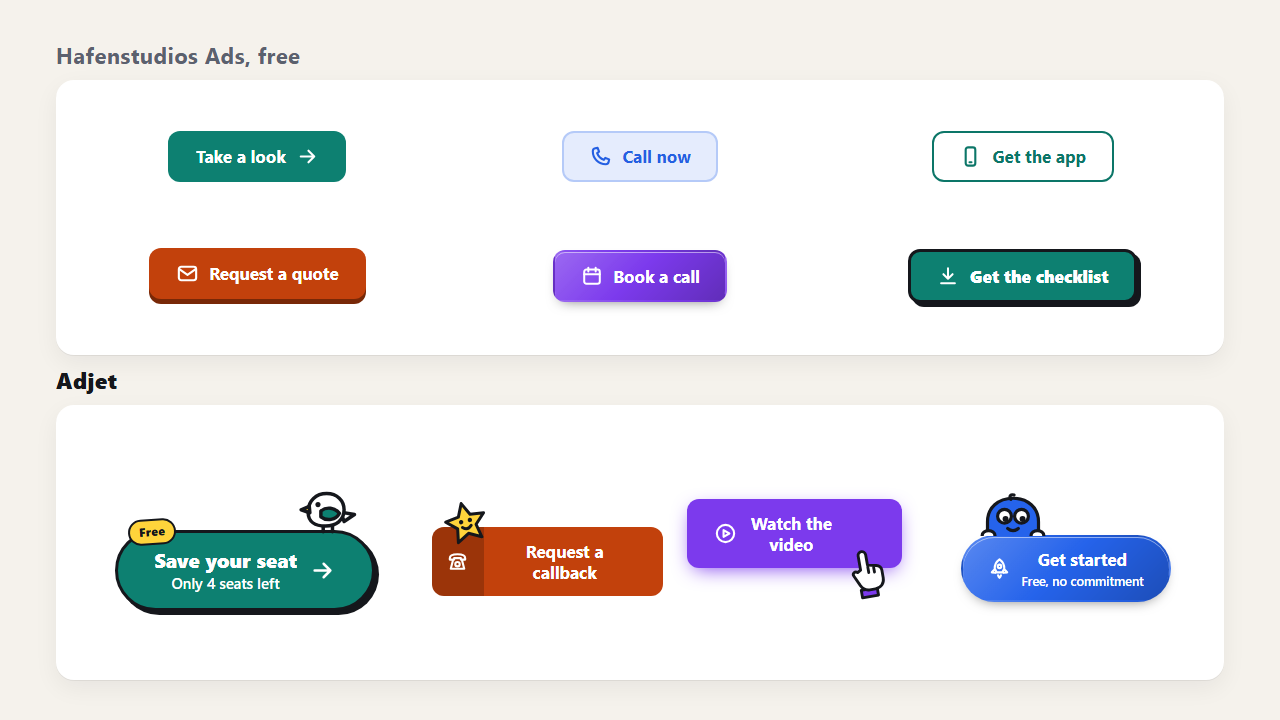
Version 3.1 gives Hafenstudios Ads and Adjet a template for exactly this button. The image shows real buttons from the plugin, the six styles of the free edition at the top and four examples from Adjet below.
A button is an ad block
The conversion button is a template in the same block system as banners, offer boxes or sign-up forms. That is why it can do everything any block can from day one:
- Placement: automatically before or after the content or after a specific paragraph, in all posts at once.
- By hand: with a shortcode, a widget or the block in the editor, exactly where it should go.
- Click counting: every click ends up in the statistics in your own database.
- Split tests: in Adjet with one click as a style test, more on that below.
In the template gallery the button comes right after the core formats. If you choose the goal "Clicks on an offer", the gallery recommends it first. How the gallery asks about your goal is covered in the post on Adjet 3.0.
One color is enough
You choose the style, icon and character from cards with a small preview. The cards and the large preview next to them already show your color. You set exactly one color and the plugin takes care of the text: it uses white or black, whichever reads better on your color. For the light styles Tinted and Outline it also works out a darker shade of your color for the text.
We tested this with 134 colors. The contrast reached at least WCAG AA every time, which means 4.5 to 1 for normal text. The button takes its font from your website, so it matches your headings and body text.
On top of that there are three shapes (Rounded, Pill, Square), two sizes, the choice between the width of the text and full width, and an optional line below the text, such as "Free, no commitment".
Free: six styles, eight icons
Hafenstudios Ads from the WordPress.org directory comes with six styles:
- Solid: the classic button in your color.
- Tinted: a light background with the text in the dark shade of your color.
- Outline: just border and text, for pages where the button should not shout.
- Key: with a visible edge, like a key you press.
- Gradient: a gradient made from your color.
- Comic: a thick outline and a hard shadow.
The eight icons cover the most common goals: arrow, phone, mobile phone, envelope, calendar, download, shopping cart and speech bubble. They stand still.
Adjet: buttons with motion and characters
Adjet adds something to every part of the button:
- Five more styles: Glow, Fine line, Two-part, Fill and Like your theme. The last one takes the color, font and corners of your theme's buttons. The preview in the plugin cannot show that, on your website the theme's look applies.
- Sixteen icons that move: on top of the eight from the free edition there are an old phone, a printer, a gift, a heart, a star, play, a lock and a rocket.
- Five effects: Light streak, Pulse ring, Wiggle, Bounce and Symbol moves. An effect plays once when the button scrolls into view and again when someone hovers over it. It does not loop forever.
- Four comic characters: hand-drawn, with a thick outline and a face. The peeker looks out from behind the button, the seagull sits on top, the star hangs at the corner and the pointing hand points at the button from below.
- Label at the corner: a short word such as "New" or "Free".
- Sparks on click: small sparks at the click point. The click itself is not held up.
- Your theme colors: next to every color picker your theme's colors appear as swatches, in every template.
Motion only when the visitor wants it
Some people tell their operating system that they want less motion on screen, for example because of dizziness or migraines. Adjet respects that: effects, moving icons and characters only run for visitors who have not turned this setting on. For everyone else the button stays still and works the same way.
Motion uses nothing but moving, rotating and fading. The browser plays that smoothly without laying out the page again. The button styles live in a separate file that only loads on pages where an active block contains a button. Pages without a button do not get heavier, in both editions.
The style test: which button gets more clicks?
Nobody knows in advance whether a comic button with a seagull gets more clicks than a plain gradient. It depends on your site and your visitors. That is why Adjet shows the box "Which style gets more clicks?" next to the button:
- Under "Second style" you pick a different style.
- You click "Start style test".
- Adjet saves the button, creates a copy with the second style and runs both as an A/B test.
Text and target stay the same, so the test measures nothing but the look. The numbers are on the Split tests page, and the decision works like every other split test in Adjet. How that works in detail and when a result holds up is explained in Split testing ads with Adjet.
In the free edition you set up the same comparison by hand: create a second button with a different style and put both in the same test group.
No rel="sponsored nofollow" by default
Ad blocks carry rel="sponsored nofollow" by default, because Google wants paid links marked that way. A conversion button, however, usually leads to your own page, your phone number or a sign-up, and those are not paid links. So the button starts without the marking. If you link to an affiliate offer, switch it on in the button settings. Banners and the other ad templates keep it, as before.
Free and Adjet compared
| Conversion button | Free (Hafenstudios Ads) | Adjet |
|---|---|---|
| Styles | 6 | 11, including "Like your theme" |
| Icons | 8, static | 16, moving |
| Shape, size, width, line below the text | yes | yes |
| One color, readable text by default | yes | yes |
| Placement, shortcode, block, widget, click counting | yes | yes |
| Effects on scroll-in | no | 5 |
| Comic characters | no | 4: peeker, seagull, pointing hand, star |
| Corner label, sparks on click | no | yes |
| Theme colors as swatches | no | yes |
| Style test | by hand with a test group | with one click |
How to get 3.1
The free edition is in the WordPress.org directory. If it is installed, WordPress offers the update under Plugins › Installed Plugins. To install it fresh, search for "Hafenstudios Ads" in the Plugins menu.
Adjet is sold through Freemius. After the purchase you get the download link and your licence key by e-mail. Adjet replaces the free edition, and your ads, settings and statistics stay where they are. If you already use Adjet, 3.1 shows up as an update in the plugin list. There is a 14-day trial of Adjet. Prices are on the pricing page, the full feature list on the Adjet product page. To try the free edition without installing anything, use the demo, which starts WordPress right in your browser.
Where to start
- Install the 3.1 update and open the template gallery.
- Choose the goal "Clicks on an offer" and pick the conversion button there.
- Put on the button what happens after the click, such as "Book a call" or "Get the checklist". "Click here" tells nobody where they are going.
- Set your color and pick a style. The plugin adjusts the text.
- Show the button after the content of all posts through placement, or put it in a specific spot with the block.
- In Adjet: once the button gets enough visitors, start a style test. By default every variant needs 500 impressions before Adjet decides.
Try conversion buttons
The free edition with six styles is in the WordPress.org directory. Moving icons, comic characters and the style test come with Adjet.
Frequently asked questions
Is the conversion button part of the free edition?
Yes. Hafenstudios Ads from the WordPress.org directory includes the template with six styles and eight icons, with shape, size, width, a line below the text and the automatically readable text color. Adjet extends it to eleven styles, sixteen moving icons, five effects, four comic characters, a corner label, sparks on click and the style test.
Does the text stay readable on every color?
Yes. You set one color and the plugin picks the text color itself: white or black, whichever reads better on your color. For the light styles it also works out a darker shade of your color for the text. Tested with 134 colors, the contrast always reaches at least WCAG AA.
Do the animations bother visitors who prefer less motion?
No. Effects, moving icons and characters only run for visitors who have not turned on reduced motion in their system. For everyone else the button stays still and works the same way. An effect also plays only once when the button scrolls into view, and again when someone hovers over it.
Why does the button not have rel="sponsored nofollow"?
Because a conversion button usually leads to your own page, your phone number or a sign-up. Those are not paid links. If you link to an affiliate offer, switch the marking on in the button settings. Banners and the other ad templates keep it on by default, as before.
Do I need a page builder for the button?
No. The conversion button is an ad block. It appears automatically before or after the content or after a specific paragraph, or you place it with a shortcode, a widget or the block in the editor. The plugin counts the clicks in your own database.
